I recently built and published a small npm package under my npm username vaibhavt07:
Package: @vaibhavt07/pace-utils — tiny utilities for formatting running pace and duration.
Source: github.com/mrtyagi07/pace-utils
This blog is a practical walkthrough of how to build a TypeScript library, bundle it with Rollup, publish it to npm, and make it safer using modern npm publishing practices.
We will build a simple package that exports two functions:
javascript1formatPace(330) // "5:30 /km" 2formatDuration(5025) // "1h 23m 45s"
By the end, you will understand:
- how npm packages are structured
- why ESM and CommonJS both matter
- how Rollup builds your library
- how TypeScript types are shipped
- how to publish safely with npm
- why OIDC trusted publishing is better than npm tokens
Here is the whole thing on one page before we start writing any code:
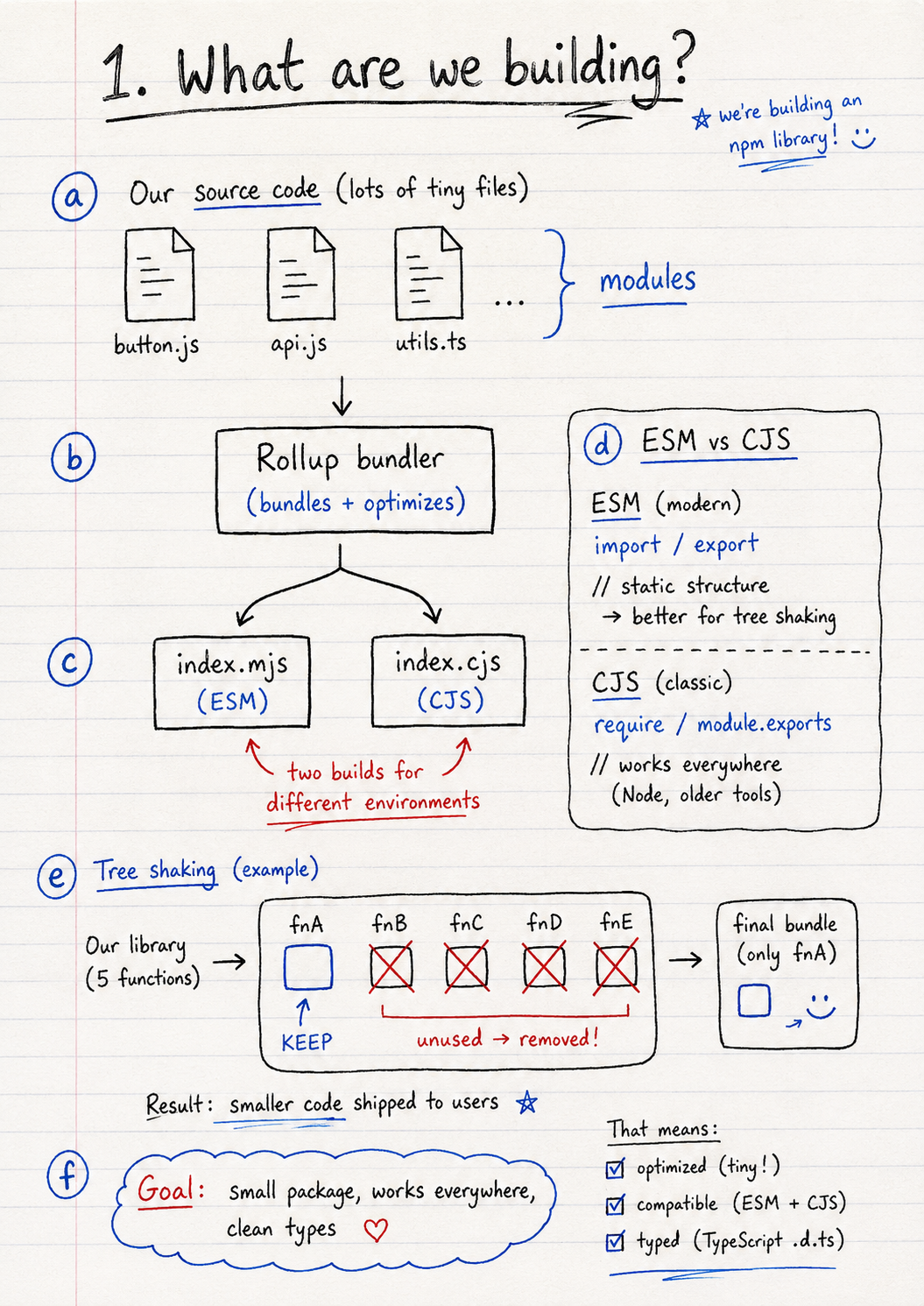
Why Rollup
We will use Rollup as the bundler. For a library (as opposed to an app), Rollup is the right pick because it produces cleaner, smaller output and supports both ESM and CommonJS in a single config. It will:
- bundle the TypeScript source
- emit ESM and CommonJS outputs side by side
- generate
.d.tstype declarations - keep the published package small with no dead code
ESM vs CommonJS
JavaScript has two common module systems.
CommonJS is older and uses:
javascript1const x = require('x') 2module.exports = x
ESM is the modern standard and uses:
javascript1import x from 'x' 2export { x }
Modern apps mostly use ESM, but many tools and older Node.js setups still support CommonJS. A good library should support both.
Tree shaking
Tree shaking means removing unused code.
For example, if your library has 50 functions but a user imports only one, the bundler can remove the other 49 from the final app bundle.
This is why libraries should be written with clean exports and no unnecessary side effects. To make sure bundlers actually trust your package to be tree-shakeable, you set "sideEffects": false in package.json (we do this in Phase 4). Without that flag, most bundlers conservatively assume importing your package may have side effects and keep all of it in the final bundle.
Phase 1: Project setup
First, check if your package name is available:
bash1npm view @vaibhavt07/pace-utils
If npm returns a 404, the name is available.
Now create the project:
bash1mkdir pace-utils 2cd pace-utils 3git init 4npm init -y
Create the basic structure:
bash1mkdir src 2touch src/index.ts 3touch README.md 4touch .gitignore
Add this to .gitignore:
1node_modules 2dist 3*.log 4.DS_Store
Install TypeScript:
bash1npm install -D typescript @types/node 2npx tsc --init
Update the important fields in package.json:
json1{ 2 "name": "@vaibhavt07/pace-utils", 3 "version": "0.0.1", 4 "description": "Tiny utilities for formatting running pace and duration." 5}
Phase 2: TypeScript setup
Replace your tsconfig.json with this:
json1{ 2 "compilerOptions": { 3 "target": "ES2020", 4 "module": "ESNext", 5 "moduleResolution": "bundler", 6 "lib": ["ES2020"], 7 8 "declaration": true, 9 "declarationMap": true, 10 "sourceMap": true, 11 "outDir": "./dist", 12 "rootDir": "./src", 13 14 "strict": true, 15 "noUncheckedIndexedAccess": true, 16 "noImplicitOverride": true, 17 18 "esModuleInterop": true, 19 "skipLibCheck": true, 20 "isolatedModules": true, 21 "forceConsistentCasingInFileNames": true, 22 "verbatimModuleSyntax": true 23 }, 24 "include": ["src/**/*"], 25 "exclude": ["node_modules", "dist"] 26}
The most important settings here are:
"declaration": true — generates .d.ts files, so users get TypeScript autocomplete.
"outDir": "./dist" — puts the compiled output in dist.
"rootDir": "./src" — tells TypeScript your source code lives inside src.
Now write the library code in src/index.ts:
typescript1export function formatPace(secondsPerKm: number): string { 2 if (!Number.isFinite(secondsPerKm) || secondsPerKm < 0) { 3 throw new RangeError( 4 `secondsPerKm must be a non-negative finite number, received: ${secondsPerKm}` 5 ) 6 } 7 8 const total = Math.round(secondsPerKm) 9 const minutes = Math.floor(total / 60) 10 const seconds = total % 60 11 12 return `${minutes}:${seconds.toString().padStart(2, '0')} /km` 13} 14 15export function formatDuration(seconds: number): string { 16 if (!Number.isFinite(seconds) || seconds < 0) { 17 throw new RangeError( 18 `seconds must be a non-negative finite number, received: ${seconds}` 19 ) 20 } 21 22 const total = Math.round(seconds) 23 const h = Math.floor(total / 3600) 24 const m = Math.floor((total % 3600) / 60) 25 const s = total % 60 26 27 if (h > 0) return `${h}h ${m}m ${s}s` 28 if (m > 0) return `${m}m ${s}s` 29 return `${s}s` 30}
Check that TypeScript is happy:
bash1npx tsc --noEmit
No output means everything is fine.
Phase 3: Add tests with Vitest
Skipping tests on a library you are about to ship to other people is a bad habit. Vitest is fast, has zero config, and reads TypeScript directly.
Install it:
bash1npm install -D vitest
Add a script to package.json:
json1"scripts": { 2 "test": "vitest run" 3}
Create src/index.test.ts:
typescript1import { describe, it, expect } from 'vitest' 2import { formatPace, formatDuration } from './index' 3 4describe('formatPace', () => { 5 it('formats whole minutes per km', () => { 6 expect(formatPace(330)).toBe('5:30 /km') 7 }) 8 9 it('pads single-digit seconds', () => { 10 expect(formatPace(305)).toBe('5:05 /km') 11 }) 12 13 it('throws on negative input', () => { 14 expect(() => formatPace(-1)).toThrow(RangeError) 15 }) 16}) 17 18describe('formatDuration', () => { 19 it('formats hours, minutes, seconds', () => { 20 expect(formatDuration(5025)).toBe('1h 23m 45s') 21 }) 22 23 it('drops the hour when zero', () => { 24 expect(formatDuration(125)).toBe('2m 5s') 25 }) 26 27 it('returns seconds only for short durations', () => { 28 expect(formatDuration(30)).toBe('30s') 29 }) 30})
Run the tests:
bash1npm test
We will also wire this into CI in Phase 7, so the package cannot be published if a test fails.
Phase 4: Build with Rollup
Install Rollup and plugins:
bash1npm install -D rollup @rollup/plugin-typescript rollup-plugin-dts tslib
Update your scripts in package.json:
json1"scripts": { 2 "clean": "rm -rf dist", 3 "prebuild": "npm run clean", 4 "build": "rollup -c", 5 "typecheck": "tsc --noEmit" 6}
Also add:
json1"type": "module"
Now create rollup.config.js:
javascript1import typescript from '@rollup/plugin-typescript' 2import dts from 'rollup-plugin-dts' 3 4const input = 'src/index.ts' 5 6export default [ 7 { 8 input, 9 output: [ 10 { 11 file: 'dist/index.mjs', 12 format: 'esm', 13 sourcemap: true, 14 }, 15 { 16 file: 'dist/index.cjs', 17 format: 'cjs', 18 sourcemap: true, 19 exports: 'named', 20 }, 21 ], 22 plugins: [ 23 typescript({ 24 tsconfig: './tsconfig.json', 25 declaration: false, 26 declarationMap: false, 27 }), 28 ], 29 }, 30 31 { 32 input, 33 output: [ 34 { file: 'dist/index.d.ts', format: 'esm' }, 35 { file: 'dist/index.d.cts', format: 'esm' }, 36 ], 37 plugins: [dts()], 38 }, 39]
This creates:
1dist/ 2 index.mjs 3 index.cjs 4 index.d.ts 5 index.d.cts 6 index.mjs.map 7 index.cjs.map
Now run:
bash1npm run build
If the build works, inspect the dist folder:
bash1ls -la dist
This is the important part: one TypeScript source file has now become a real package output that works for both ESM and CommonJS users.
Phase 5: Fix package.json for publishing
Your package needs to tell Node, bundlers, and TypeScript where the built files are.
Use this structure:
json1{ 2 "name": "@vaibhavt07/pace-utils", 3 "version": "0.0.1", 4 "description": "Tiny utilities for formatting running pace and duration.", 5 "keywords": ["running", "pace", "duration", "format", "fitness"], 6 "license": "MIT", 7 "author": "Vaibhav Tyagi <vaibhavtyagi438@gmail.com> (https://vaibhavt.com)", 8 9 "type": "module", 10 "sideEffects": false, 11 12 "main": "./dist/index.cjs", 13 "module": "./dist/index.mjs", 14 "types": "./dist/index.d.ts", 15 16 "exports": { 17 ".": { 18 "import": { 19 "types": "./dist/index.d.ts", 20 "default": "./dist/index.mjs" 21 }, 22 "require": { 23 "types": "./dist/index.d.cts", 24 "default": "./dist/index.cjs" 25 } 26 }, 27 "./package.json": "./package.json" 28 }, 29 30 "files": [ 31 "dist", 32 "README.md", 33 "LICENSE" 34 ], 35 36 "engines": { 37 "node": ">=18" 38 }, 39 40 "publishConfig": { 41 "access": "public" 42 }, 43 44 "scripts": { 45 "clean": "rm -rf dist", 46 "prebuild": "npm run clean", 47 "build": "rollup -c", 48 "test": "vitest run", 49 "typecheck": "tsc --noEmit", 50 "prepublishOnly": "npm run typecheck && npm test && npm run build" 51 } 52}
The key fields are:
"main": "./dist/index.cjs" — for CommonJS users.
"module": "./dist/index.mjs" — for older bundlers that look for ESM.
"types": "./dist/index.d.ts" — for TypeScript.
"exports" — the modern source of truth. This tells Node exactly what file to load for import and require.
Also important:
"files": ["dist", "README.md", "LICENSE"] — this is an allowlist. Only these files will be published to npm. It prevents accidentally shipping source files, .env, config files, or random local files.
Before publishing, always run:
bash1npm pack --dry-run
Read the output carefully. Make sure only the files you expect are included.
Phase 6: Publish to npm
Create a simple README.md:
markdown1# @vaibhavt07/pace-utils 2 3Tiny utilities for formatting running pace and duration. 4 5## Install 6 7```bash 8npm install @vaibhavt07/pace-utils 9``` 10 11## Usage 12 13```javascript 14import { formatPace, formatDuration } from '@vaibhavt07/pace-utils' 15 16formatPace(330) // "5:30 /km" 17formatDuration(5025) // "1h 23m 45s" 18formatDuration(30) // "30s" 19``` 20 21## License 22 23MIT
Add an MIT LICENSE.
Then log in to npm:
bash1npm login
Before publishing:
bash1npm run build 2npm pack --dry-run
Then publish:
bash1npm publish
If everything is correct, your package is live.
You can verify it:
bash1npm view @vaibhavt07/pace-utils
Test it in a fresh folder:
bash1mkdir test-published 2cd test-published 3npm init -y 4npm install @vaibhavt07/pace-utils 5node -e "import('@vaibhavt07/pace-utils').then(m => console.log(m.formatPace(330)))"
If it prints:
5:30 /kmYou shipped it.
Phase 7: Safer publishing with OIDC and provenance
Manual publishing works, but the better approach in 2026 is OIDC trusted publishing.
The old way was to create an npm token and store it in GitHub Actions as NPM_TOKEN.
The problem is simple: tokens can leak.
OIDC removes the token completely. GitHub Actions proves its identity to npm at publish time using a short-lived token. Nothing long-lived is stored in GitHub. Nothing can be stolen from your .env.
Create .github/workflows/publish.yml:
yaml1name: Publish to npm 2 3on: 4 release: 5 types: [published] 6 7jobs: 8 publish: 9 runs-on: ubuntu-latest 10 11 permissions: 12 contents: read 13 id-token: write 14 15 steps: 16 - name: Checkout 17 uses: actions/checkout@v4 18 19 - name: Setup Node 20 uses: actions/setup-node@v4 21 with: 22 node-version: '20' 23 registry-url: 'https://registry.npmjs.org' 24 25 - name: Update npm 26 run: npm install -g npm@latest 27 28 - name: Install dependencies 29 run: npm ci 30 31 - name: Typecheck 32 run: npm run typecheck 33 34 - name: Test 35 run: npm test 36 37 - name: Build 38 run: npm run build 39 40 - name: Publish 41 run: npm publish --provenance --access public
The --provenance flag is the part most blog posts skip, and it is the actual reason OIDC is interesting in 2026. With it, npm records a signed attestation that this exact tarball was built from this exact commit by this exact workflow. Users see a verified provenance badge on your npm page, and tooling can verify the chain before installing. Without --provenance, you have just swapped a long-lived token for a short-lived one and missed the supply-chain win.
Then go to your npm package settings and add a trusted publisher:
- provider: GitHub Actions
- repository: your GitHub repo
- workflow filename:
publish.yml - allowed action:
npm publish
Now publishing works through GitHub Releases.
Update the version:
json1"version": "0.0.2"
Commit and push:
bash1git add . 2git commit -m "Release v0.0.2" 3git push
Create a GitHub Release with tag:
v0.0.2When the release is published, GitHub Actions will run and publish the package to npm.
The best part: no npm token is stored anywhere.
That is the real security win.
A gotcha that cost me an hour
The first version of my exports map looked correct to me but kept breaking TypeScript autocomplete for consumers using "moduleResolution": "bundler". The fix was the order of keys inside each condition:
json1"import": { 2 "types": "./dist/index.d.ts", 3 "default": "./dist/index.mjs" 4}
"types" has to come first. Node and bundlers stop at the first matching key, so if "default" is listed before "types", TypeScript never sees the type declarations and your users get any everywhere. There is no error, no warning — just silently broken types. The official docs mention this in passing, but it is easy to miss. If autocomplete is dead in a fresh project after installing your package, this is almost always why.
Final thoughts
A shippable package is small surface, large discipline: dual ESM + CJS outputs, an exports map with "types" first, a files allowlist, tests that run in CI, and OIDC publishing with --provenance so users can verify what they install. Get those right and you are ahead of most packages on npm.
Comments
No login needed. Be kind.
- No comments yet. Be the first.